If you have setup more than one email account in your Outlook (Work and Home) you may have realized a need for some type of pop-up dialog which will ask you which account you want to use when creating a new email. Outlook lets you define a default account, but obviously that's not good enough. I decided to write a small and simple add-in which will ask me to select the sending account every time I compose a new email. (Even if Outlook already has such a tool, I couldn't find it! and I wanted to gain some Office programming knowledge anyways.)
I used Visual Studio 2008 and created a new Office project of type Outlook Add-in. This will give you the basics you need. Just fill the methods with your code and you are done.
public partial class ThisAddIn
    {
        private Outlook.Inspectors Inspectors;

        private void ThisAddIn_Startup(object sender, System.EventArgs e)
        {
            Inspectors = this.Application.Inspectors;
            Inspectors.NewInspector += new Microsoft.Office.Interop.Outlook.InspectorsEvents_NewInspectorEventHandler(Inspectors_NewInspector);

            foreach (Outlook.Inspector inspector in Inspectors)
            {
                Inspectors_NewInspector(inspector);
            }
        }

        void Inspectors_NewInspector(Microsoft.Office.Interop.Outlook.Inspector Inspector)
        {
            if (Inspector.CurrentItem is Outlook.MailItem)
            {
                Outlook.MailItem item = (Outlook.MailItem)Inspector.CurrentItem;
                if (string.IsNullOrEmpty(item.Body) && string.IsNullOrEmpty(item.Subject) && string.IsNullOrEmpty(item.To))
                {
                    Outlook.MailItem ThisItem = (Outlook.MailItem)Inspector.CurrentItem;
                    Accounts accForm = new Accounts();
                    System.Windows.Forms.ComboBox cboAccounts = (System.Windows.Forms.ComboBox)accForm.Controls["cboAccounts"];
                    foreach (Outlook.Account account in this.Application.Session.Accounts)
                    {
                        cboAccounts.Items.Add(account.DisplayName);
                    }
                    cboAccounts.SelectedIndex = 0;
                    accForm.ShowDialog();
                    ThisItem.SendUsingAccount = this.Application.Session.Accounts[cboAccounts.SelectedIndex + 1];
                }
            }
        }

        private void ThisAddIn_Shutdown(object sender, System.EventArgs e)
        {
            Inspectors.NewInspector -= new Outlook.InspectorsEvents_NewInspectorEventHandler(Inspectors_NewInspector);
            Inspectors = null;
        }

        #region VSTO generated code

        ///
        /// Required method for Designer support - do not modify
        /// the contents of this method with the code editor.
        ///
        private void InternalStartup()
        {
            this.Startup += new System.EventHandler(ThisAddIn_Startup);
            this.Shutdown += new System.EventHandler(ThisAddIn_Shutdown);
        }

        #endregion
    }
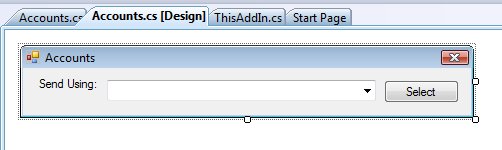
Accounts() is a Windows Form which only contains a dropdown and a button:
8a323012-a02c-4835-9513-3483c7384e22|0|.0|96d5b379-7e1d-4dac-a6ba-1e50db561b04